ReddRadar

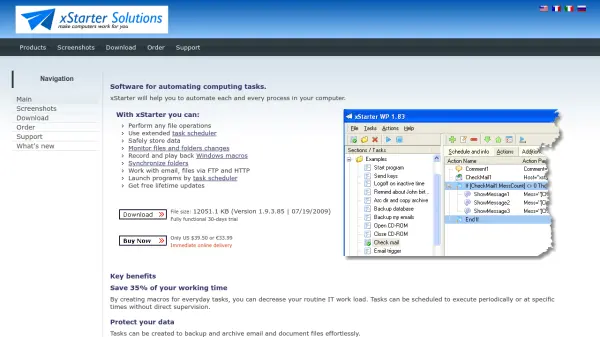
What is xStarter?
xStarter is a comprehensive software solution designed to automate a wide range of computing tasks on Windows systems. It allows users to create customizable task lists for file operations, folder synchronization, data backup, and advanced scheduling, all through an intuitive interface requiring no programming skills.
With xStarter, users can monitor changes in files and folders, record and playback Windows macros, work with emails and files via FTP/HTTP, and even control tasks remotely via a web browser. The tool offers advanced scheduling options, secure data management, and the ability to compile tasks into portable executables for deployment across multiple PCs.
Features
- Advanced Task Scheduler: Schedule task execution at precise intervals, on events, or periodically.
- Macro Recording and Playback: Record and play back sequences of keystrokes, mouse actions, and user clicks across Windows applications.
- File and Folder Monitoring: Track changes in files and folders and notify users via network messages or email.
- Email and Internet Actions: Send and receive emails, manipulate files over FTP and HTTP protocols.
- Remote Task Management: Run, view, and control tasks on remote computers via a web browser through Web Pilot.
- Task Compilation: Compile created tasks into standalone executable files for portability.
- Data Backup and Synchronization: Automate backups and synchronizations of important files and folders.
- User-Friendly Interface: Designed for users with basic computer skills, enabling automation without programming.
Use Cases
- Automating daily file backup and archiving processes.
- Replacing and improving upon the Windows Task Scheduler for advanced scheduling requirements.
- Recording repetitive user actions for automated playback in Windows applications.
- Synchronizing folders between local and network drives.
- Monitoring changes in important files and receiving automatic notifications.
- Managing tasks on remote computers via a web browser.
- Downloading and organizing email report attachments automatically.
- Compiling and distributing automation tasks across multiple systems.
Related Queries
Helpful for people in the following professions
xStarter Uptime Monitor
Average Uptime
99.72%
Average Response Time
410.9 ms

Featured Tools
Join Our Newsletter
Stay updated with the latest AI tools, news, and offers by subscribing to our weekly newsletter.